There is a known issue with Autodesk Revit 2014 Update #3 and API apps using Dockable Panes, which effects Family Browser 2014. If you install this update and have Family Browser installed (or any other API that has a dockable form), Revit will fatal error when you close a Family or Project Document.
Autodesk is now aware of the issue and are working on a fix and update. We will let you know as soon as that is available.
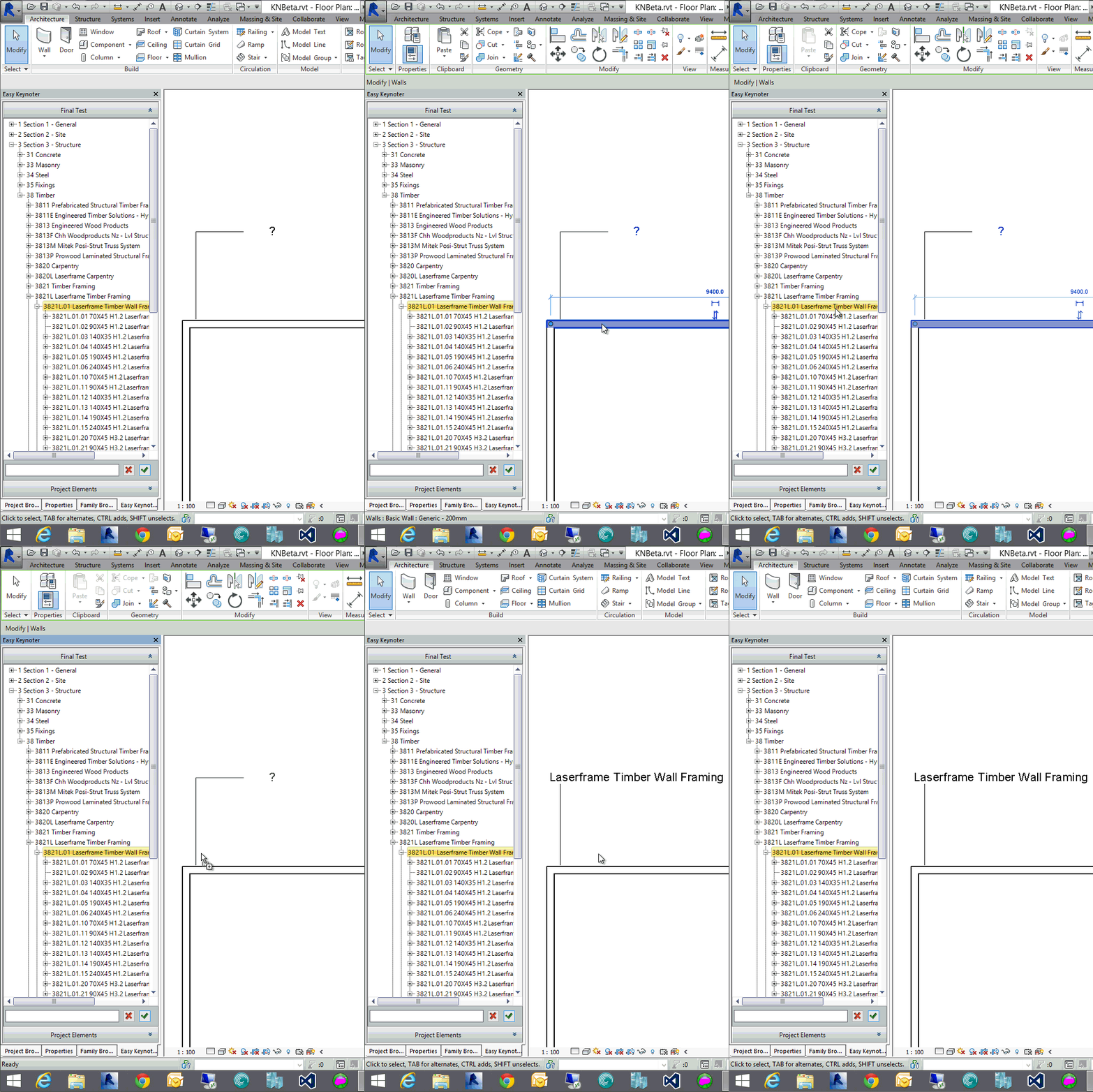
If you are a heavy user of Revit keynotes and are using Revit 2015 we are looking for keen Beta testers for a brand new product that is due to be released to public 1st July 2014.
The main features of Easy Keynoter are:
Fully integrated into the Revit UI
All Keynote data stored within a Database. No reliance on Revit reading txt files or the need to have intermediary xml files. This means that there are no issues of multiple users editing the keynotes at the same time as with other systems.
Add Edit and remove keynote changes are reflected immediately in the Revit project. No need to manual Load/Reload operation from within the Revit UI
Drag and Drop Keynotes from the Palette directly onto Revit Elements to keynote those elements.
Super fast search function. Easy keynoter will display all search compliant keynotes in seconds. We have tested this on a keynote file with over 20,000 keynotes and the results displayed within 1 second.
Easily Import/Export your existing old Keynote.txt files into and out of the Database.
User management. Create user groups and assign who is allowed to add/edit/remove keynotes from the database.
One Revit power user that has seen this product commented. “Mate, looks f@#*ing awesome, bring it on.”
If you would like to test and provide feedback on this new product please contact us HERE and we will get back to you with a link for download.
The Family Browser Labs Project is a testing platform for new features and idea concepts for our full Family Browser product. It allows independent modular testing of ideas outside of the commercial Family Browser product without affecting its source code. Once a new module has been fully developed (with an emphasis on the users feedback) it may either be integrated with the full Family Browser product or developed as a standalone product. The initial Labs release is concentrating on these issues/ideas:1. Create a very simple way of finding families in your project or external library, and inserting them into the project.2. Provide a very powerful fast search engine to find the families that you want, whether that be family name, category, Parameter name or value.3. Provide an easy way of adding content to your external library (Revit families, drafting views, schedules, system families and groups) As time goes on we will be adding and testing other features/ideas.
Try For FREE
To help us out join our testing team by clicking on this link HERE. It is FREE. The only thing we ask of you in return is honest feedback that will help keep Kiwi Codes Family Browser the best Revit Family Browser on the Market.
If you have updated to our latest version of Family Browser for Revit 2014 and have chosen to display it in the new docked mode and you receive the below error when you drag and drop a family onto the Revit drawing there is a good reason for this.
There was a bug in the RTM version of the Revit 2014 API that disallowed drag and drop from a docked panel, but thankfully this was resolved in Revit Update 1. You need to be running at least the below version of Revit to run Family Browser in the docked state.
For those using our Project Browser you don't have long to wait now before a new build that is Dockable to the Revit UI like Family Browser now is. Keep an eye out here for news in the next few days.
Have you noticed before in Family Browser 2014, that when you insert a family from Family Browser that is Hosted ie, workplane/facebased that the icons to change host on insertion are disabled as shown below?
It turns out that because of the changes required in the Revit 2014 API with the way we interact with the Revit database from modal dialogues, the buttons become disabled. After going back and forth with Autodesk support it was found that there is actually a limitation in the API to support this.
This is a major issue for a majority of our customers so after some testing I have found an unsupported way around this issue, until Autodesk includes this functionality in the API. So now when you insert a hosted family from FB 2014 you will get the icons available as per below. This is available in the current download of FB 2014 from our webpage - Downloads
Please let me know if you stumble across any issues with this.
We are very proud to announce that from today Family Browser is now fully integrated into Autodesk Revit 2014 software.
Users now have the ability to run Family Browser in "Classic Mode", as per the existing Family Browser floating mode, or have it docked within the Autodesk Revit user interface.
Running Family Browser in the docked state integrates Family Browser seamlessly into the UI, which can then be docked left,right, top, bottom and as a tabbed item along with the Project Browser etc.
Family Browser will start-up automatically on Revit start and remember the previous position and state it was in.
Our studies have shown that users are far more likely to use an application if it is always open and even more so if they don't even realise they are using an external application.
We have had some reports from testers that their users are so happy that finally Revit has a built in Family Browser. :)
PLEASE NOTE: Web Update 1 must be installed first for this feature to work.
Yesterday we uploaded to our web site new builds of Family Browser 2013 & 2014. These new builds addressed mainly feedback that we received during the RTC Conference in Auckland last month.
Floating Network Licenses:
We now offer Floating Network licenses for both Family Browser 2013 & 2014 for orders over 10 users. This can be ordered from our webpage by selecting the "Network Floating User" license type.
Current Project Family Group (FB 2014 Pro Version):
When Family Browser is now opened, automatically there will be a group created that shows the current families that are loaded in the project. The user has some choices of what categories to show and whether that should show as a tree view in one single tab are split up with tabs per each category. To see this in action watch this video.
Family Already Loaded Icon (FB 2013 & 14):
When the user moves their mouse over a Family Browser icon a blue "P" will appear in the bottom left hand side of the icon if that family is already loaded into the current project.
Other Tweaks:
Fixed an issue with trying to load a family with a numeric name ie. 100.rfa
Added a default icon to the favorites tab if no favorites
had been added.
Optimized and speed up the advanced search database for very large family libraries.
Advanced search now allows duplicate family names to show up.
The new builds have been uploaded to our website as trial versions and full versions from the members area. http://www.kiwicodes.com
Keep the comments/suggestions and future ideas coming. We have some seller ideas that we are currently working on at the moment for future releases.
Kiwi Codes
has had a very successful time exhibiting at RTC AUS at the “Langman Hotel” in Auckland
New Zealand , 16th to the 18th May.
It was
great to catch up with allot of our existing Australasian clients and get their
feedback on how they are using our time saving Revit tools and also hearing
their fantastic suggestions for future enhancements to our existing tools and
also new ideas for other tools. It was
also great to showcase our tools to others who as yet are not our clients.
Common questions
that were asked by people were:
Do you
offer Network/Floating licensing model for your tools?
It would be
great if Family Browser showed the currently loaded families in the current
project as a separate group like what KC Project Browser does.
How can we
buy all of your products at once as a suite package?
Are you
attending RTC NA this year?
The good
news is that items 1 & 2 are going to be addressed in a new build of
Family/Project Browser by the 31st of May 2013.
Keep an eye on our web site for the new build/features this Friday.
A suite
license is something will address a little further down the track. We need to change around our licensing a
little to allow a single key to unlock selected features, but it is all
possible.
The real
exciting news is that, Yes we are attending RTC NA in Vancouver Canada on the
11th – 14th July 2013. North America is
our biggest customer base and we are really excited to meet face to face our
existing customers. If you are there
make sure you find some time to visit us at Booth #21 for a catch up.
We are very
pleased to announce the strategic partnership between Kiwi Codes Solutions and
the leading design, architecture, engineering and planning firm, HOK. HOK have this week announced a global roll-out of Project Browser and Family Browser throughout their firm.
“HOK has been looking
for a family and project browser management solution for a long time with very
limited success. Kiwicodes’ simple and elegant approach proved to be the
most flexible and powerful compared to other tools. ” - Greg Schleusner
– Firm wide buildingSMART Leader – HOK
“I have implemented
Family Browser successfully at another practice and KiwiCodes have always been
very responsive to our feedback. This factor alone was very important to HOK
because we like to fine-tune everything to suit our needs. Couple this with the
tool’s beautiful simplicity, and the decision was quite clear.” – David
Baldacchino, buildingSMART Manager - Texas Region
With this
alliance, Kiwi Codes will gain valuable insight into the complexities of
Project and Family management across a global firm, while HOK gain instant
productivity gains through Project and Family Management, like no other Revit
Addin on the market does.
These
developments mark the beginning of an exciting era for Kiwi Codes Project and Family
Browsers.
Don't just take our word for it. Family Browser IS FANTASTIC and saves you a ton of time.
Adam Simmons from Gensler reviewed Family Browser at the latest Autodesk University 2012 in Las Vegas recently and below is the screen cast from his presentation regarding Family Browser.
Thank you Adam for taking the time to try and review Family Browser.
A few weeks ago we updated both Family Browser and Project Browser with an
advanced search function that can search by family Name, Family Type, Parameter
Type, Name and Value.
I have included below two YouTube video to show how easy this function is to
use.
Recently Steve Stafford of Revit OpEd and James Herndon from TheRevitBlog has just recently blogged about different ways to show graphically views which are placed on sheets in the Revit Project Browser.
While these ways are a valid way of achieving that task we believe that with Kiwi Codes Project Browser we have a much more elegant and visual way of achieving this.
This YouTube video shows just how easy it is in KC Project Browser.
You may have noticed in the latest build of our products that we are now
using flash new installer software.
We have done this to be more Windows
compliant and certainly helps with the Family/Project Browser deployment and uninstall
etc.
One side effect that this has caused is the new Parameter values required to
install our Apps Silently. Instead of the "/s" switch this has now
changed to "/qn ALLUSERS=1" for example you would run "FamilyBrowser-1-10-15-1.exe
/qn ALLUSERS=1" from DOS or a VB script at user login to install Family Browser
silently for all users.
Email us if you have any questions regarding this.
Sheet Counter is a simple automatic sheet counter for Revit 2013 which counts how many sheets are in the project and numbers the sheets ie sheet 23 of 97.
You can remove, exclude or add sheets and Sheet Counter will automatically renumber the sheets for you.
We are very pleased to announce that new builds are now available for download from our website that includes a brand new "Advanced Search" engine. The existing quick family name search remains but now we are able to search by any combination of:
Family Category
Family Name
Family Type
Parameter Name
Parameter Type
Parameter Value
The most fantastic part about the search is the real-time instant updates of complying families, shown graphically within the search tab.
Well at last the days are beginning to lengthen out and warm up in the southern hemisphere.
As a special to celebrate the arrival of Spring here in the southern hemisphere we offering a 20% discount of Project Browser for orders under 10 licenses, and 25% on orders over 10. This special runs until the 14th September 2012. http://www.kiwicodes.com/specials/16-project-browser.html
So if you have been sitting on the fence or just upgraded your Revit version to 2013, make sure you don't miss out on the fantastic limited time deal.
Another Enhancement/New Feature that has just been added to Family/Project
Browser is a new "Recently Used Families" expander bar at the bottom
of Family Browser above the search bar.
This expander replaces Revit Component Type Selector which also lists the
most recently used families, but in a more convenient location.